

Six changes shipped this week, and most of them are about reach: Zero now works in ten languages, and two tools that had been limited to internal testing — Zero Finance and Zero People Search — are available in every workspace.
Zero speaks 10 languages
Pick a language in Settings → Preference and the whole product follows: chat, agents, workflows, connectors, artifacts, billing, onboarding, right down to the error messages. Eight languages joined English and Brazilian Portuguese this week — German, Spanish, French, Italian, Japanese, Korean, Hindi, and Indonesian.
Zero also notices what language your browser is set to and starts there, so a new teammate in Munich or Osaka lands in a workspace they can read without changing a setting. Your choice is saved to your account rather than the computer you are on, so it follows you to the desktop app and to a second machine.

Zero Finance
Zero Finance moved out of internal testing. Ask for a share price, a company profile, a ticker lookup, or how a stock has moved over the past year, and Zero fetches it from a built-in market data source — no API key, nothing to connect, no separate subscription.
It is switched on by default, so you can just ask. Useful for the work that repeats: a Monday morning market brief, a watchlist digest posted to Slack, a competitor's earnings summary dropped into a Notion page.
Zero People Search
Zero People Search left internal testing the same week. Search public professional profiles by name, role, employer, education, skill, or location, and Zero gives you the profiles alongside the pages it found them on.
It is switched on by default too. Zero also states every time what the tool is for — professional research such as recruiting, partner diligence, and conference prep — and what it is not for. Profile details are assembled automatically from public pages, so check anything that matters against the sources listed with them.
Artifacts
The Artifacts section is switched on for all organizations. Presentations, websites, images, videos, and files your agents produce collect in one place, sorted by type, instead of being buried in the conversation that created them.

DeepSeek V4 Flash
DeepSeek V4 Flash is selectable in Settings → Models → Add model for all workspaces. It is a built-in model covered by workspace credits — no Pro plan and no API key needed — which makes it a cheap default for high-volume everyday work, where you would rather not spend the budget of a top-tier model.

Email drafts you review before anything is sent
Ask Zero to write an email and it creates the draft in Gmail and hands you a link. Nothing goes out. You open the link, read it, and press send yourself — Zero has no way to send an email on your behalf.
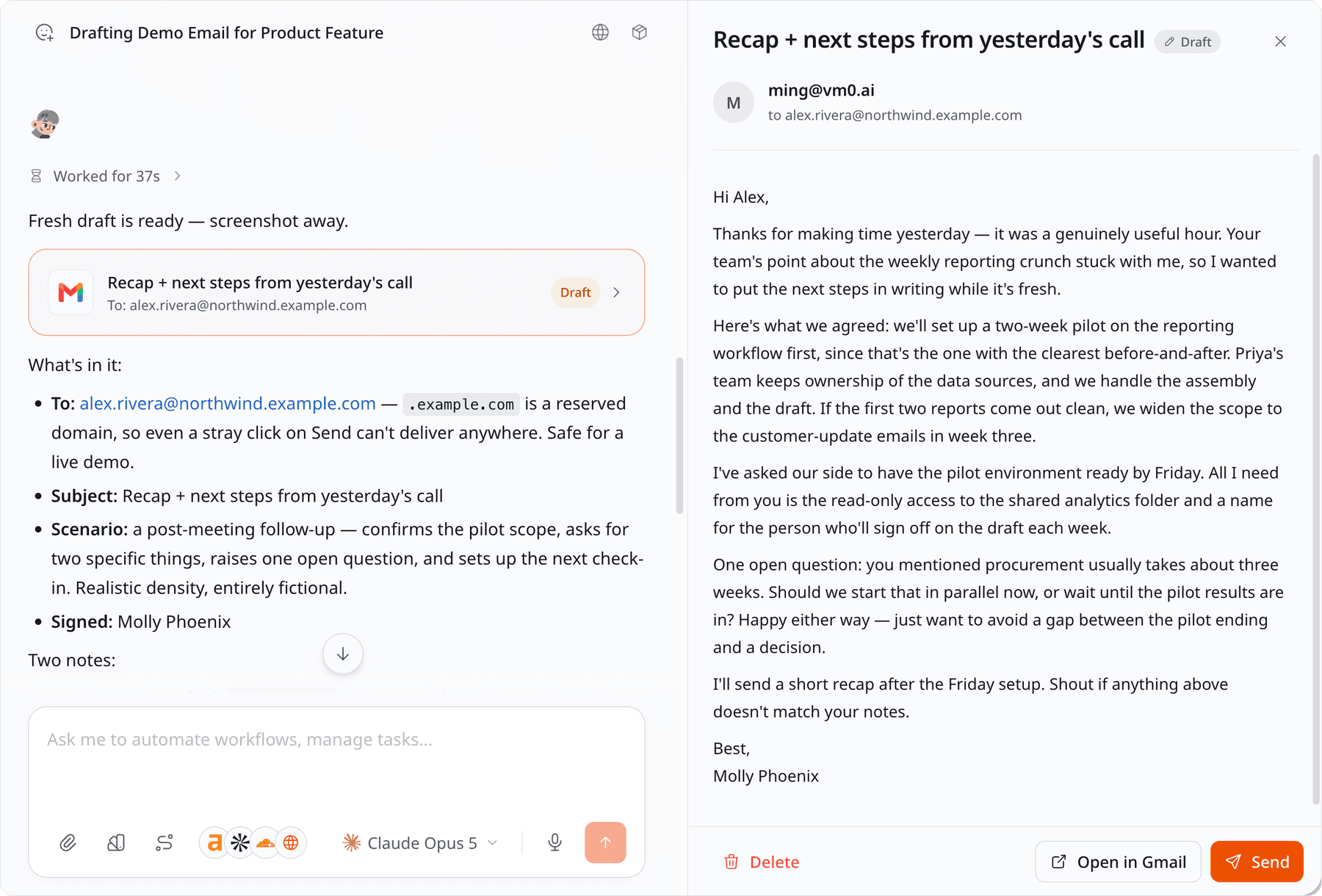
The draft stays live until you send it, so you can keep working on it. Change your mind about which address it comes from, want an attachment added or taken out, want the second paragraph rewritten — just say so, and Zero edits that same draft and gives you back the same link, instead of leaving a trail of near-duplicates in your drafts folder.
Smaller updates
- Workflow search in the composer. Type
/and match any part of a workflow's name, not just the beginning./reportnow findsdaily-signup-report. - Slack DMs remember the conversation. Messaging Zero directly in Slack is now one continuous thread instead of a series of separate questions. Reply inside a Slack thread and that becomes its own side conversation, and each agent keeps its own history when you switch between them.
- Setting up a GitHub automation no longer dead-ends. To have Zero react to GitHub events — a label applied, a workflow run finishing — your workspace needs Zero's GitHub App installed on your GitHub organization. If it wasn't, the setup screen said so and stopped there, with nothing to click and no way to install it, so a new workspace could not turn on any GitHub automation at all. Admins now get an Install GitHub App button in that same screen, and everyone else is told to ask an admin.
- Ask Zero for a website and you no longer get blank gaps where pictures should be. Some images were being dropped from the page as it was built. All eleven built-in website templates were rebuilt to fix it, and Zero uses them by default.
- One side panel in chat. Artifacts, email drafts, browser sessions, and automations all open in the same panel beside the conversation.
The workflow library moved, and grew
The public library of Zero workflows now lives at vm0.ai/workflow-automation-examples; it used to sit under /use-cases, and the old links redirect.

It went from 14 examples to 20, and the six additions deliberately reach past the Gmail-and-Slack set: Xero actuals into budget variance commentary, calendar activity into a billable-hours recap, customer calls into a living messaging doc, website analytics into a weekly growth report, calendar changes into availability blocks, and X bookmarks into notes and tasks. That pulls Xero, Brex, Granola, Airtable, Intercom, PostHog, Plausible, Calendly, Linear, and Notion into the gallery.
Every page lists the connectors a workflow needs, the prompt that starts it, and the steps Zero runs — so you can copy one and adapt it rather than starting from a blank composer.

From the blog
Four posts went up this week:
- Claude Alternative for Teams: Zero vs Claude Tag, Claude Code, and Cowork
- AI Agent Use Cases: 20 Agentic AI Examples (2026)
- How to Reduce AI Agent Costs Without Using It Less
- 1.3 Million Lines, 630 PRs a Week: How We Keep a Vibe-Coded Codebase Maintainable
Coming up: Meet & Build in San Francisco
Scarlett is hosting Meet & Build: From Workflow Bottleneck to AI Teammate on Thursday, August 6, 6:30–8:00 PM PDT, at 2000 Post St, San Francisco.
Bring your laptop and one real business challenge — a recurring workflow that eats the week, an unfinished process, a messy handoff, lead follow-up, meeting action items, reporting. You will talk it through with a small group, find the bottleneck underneath it, and use Zero to turn it into a working first solution before you leave. You will also work out which parts should be automated, which should stay human, and where an approval or a follow-up belongs.
Everyone who comes gets complimentary Pro access for the session, so you are building with the full toolset rather than a trial. No technical background needed.

That's everything we shipped this week. If your team works in a language other than English, Settings → Preference is worth two minutes.


